Shout, in anybrowser.
The Shout web app is the whole of Shout at web.shoutsocialmedia.app. It works in any modern browser on Android, iPhone, iPad and computers, with the same account as the iPhone app.
Free. 18 and over. Nothing to download from a store: install it from your browser and it works like any other app. On iPhone you can also get the App Store app, with the same account.
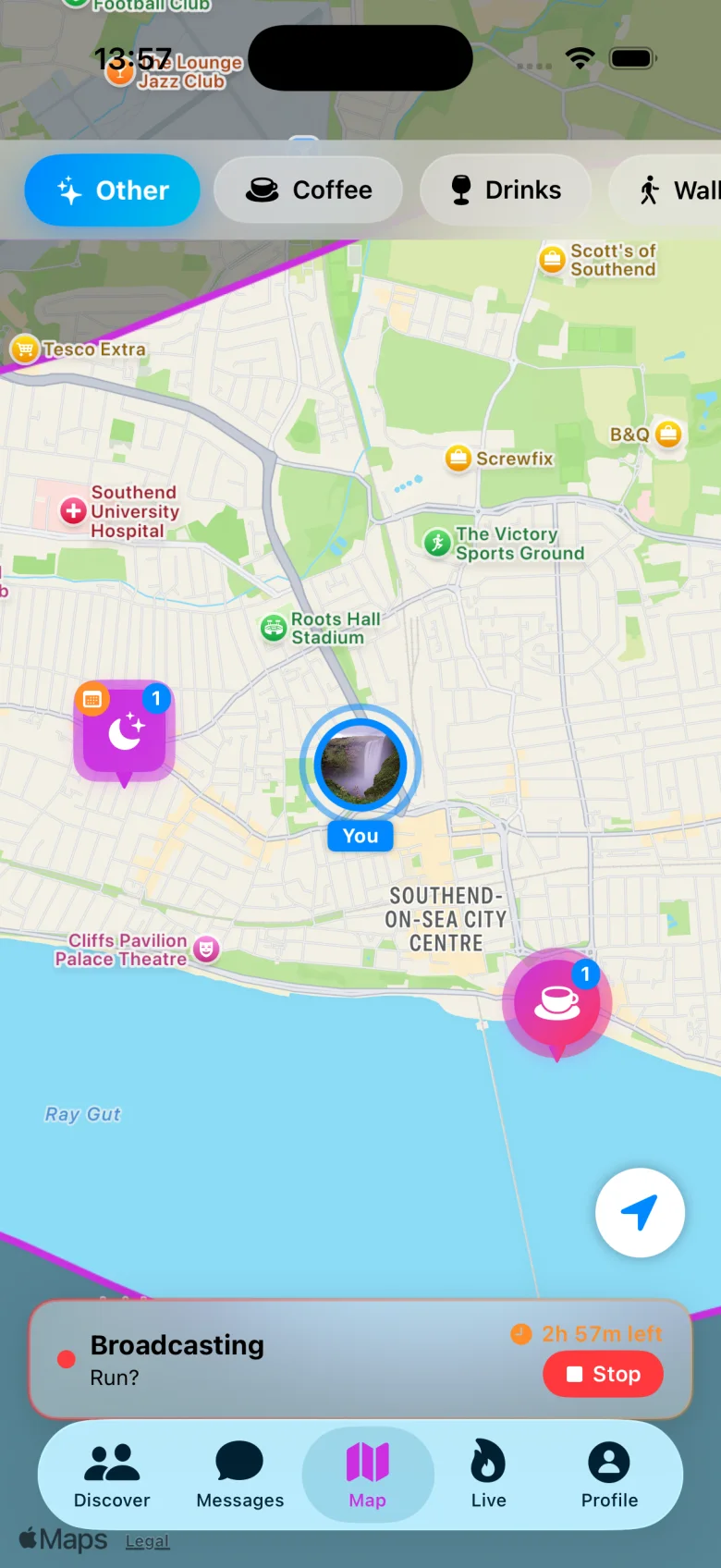
Fig. 1The same live map in the browser as on iPhone.
(01)What it is
The whole of Shout.No store needed.
- 01
Everything’s there
The live map, shouts, events, hangouts, messages and your profile. It’s the whole of Shout, not a cut-down version.
- 02
One account
Sign in with the account you use on the iPhone app, and your profile, friends and messages are already there.
- 03
Installs like an app
Add it to your Home screen, Dock or taskbar and it opens full screen with its own icon. No address bar, no tabs.
- 04
Notifications
Switch them on inside the web app and new messages and activity reach you, just as they do on iPhone.
(02)Install it
Install it inthirty seconds.
Installing is optional: Shout works in an ordinary browser tab too. Installed, it gets its own icon and opens full screen, and on iPhone and iPad it can send you notifications.
Android
In Chrome. Edge and Samsung Internet work too (in Samsung Internet the menu is ☰ at the bottom).
Open web.shoutsocialmedia.app in Chrome.
If Chrome offers to install Shout, tap Install and skip to step 4.
Otherwise tap the menu three-dot menu at the top right, then Install app or Add to Home screen, then Install.
Open Shout from your Home screen or app drawer and sign in.
Switch notifications on inside Shout when it asks, so you don’t miss a message.
iPhone & iPad
In Safari. Notifications need iOS or iPadOS 16.4 or later.
Opened this from Instagram, Facebook or another app?
Their built-in browsers can’t add Shout to your Home Screen. Use their menu to open this page in Safari first, then follow the steps.
Open web.shoutsocialmedia.app in Safari.
Tap Share, the square with an arrow pointing up. It’s at the bottom of the screen on iPhone and at the top on iPad. If you see the More button instead, tap that first.
Scroll down the list and tap Add to Home Screen.
If you see Open as Web App, leave it switched on. Then tap Add.
Open Shout from your Home Screen and sign in there. The Home Screen app keeps its own sign-in, separate from Safari.
Switch notifications on inside Shout. iPhone and iPad only send them to web apps added to the Home Screen, on iOS or iPadOS 16.4 or later.
Rather have the native app?
Shout is on the App Store too. It’s the same account, so you can use either, or both.
Desktop
In Chrome or Edge on Windows, macOS, ChromeOS or Linux, or Safari on a Mac.
Open web.shoutsocialmedia.app in Chrome or Edge.
Click the install icon at the right-hand end of the address bar, then Install.
No icon? Use the browser menu instead. In Chrome: three-dot menu, then Cast, save, and share, then Install page as app. In Edge: Settings and more menu, then Apps, then Install this site as an app.
Shout opens in its own window. Pin it to your taskbar or Dock, and switch notifications on inside Shout.
Safari on a Mac
On macOS Sonoma or later, open web.shoutsocialmedia.app in Safari and choose File, then Add to Dock.
Firefox
Firefox on a computer doesn’t install web apps. Use Shout in an ordinary tab: it’s the full app.
Notifications
You switch them on from inside the web app.
Android and computers. Allow them when your browser asks.
iPhone and iPad. Add Shout to your Home Screen first (it needs iOS or iPadOS 16.4 or later), open it from there, then switch them on.
(03)Questions
Quick answers.
01Is the web app free?
Yes. Shout is free, in your browser and on iPhone.
02Is it the same account as the iPhone app?
Yes. Sign in with your Shout account and your profile, friends and messages are all there. Whatever you do on one shows up on the other.
03Do I have to install it?
No. Shout works in an ordinary browser tab too. Installing it gives you an icon, a full-screen window and, on iPhone and iPad, notifications.
04Will I get notifications?
Yes, once you switch them on inside the web app. On iPhone and iPad you need iOS or iPadOS 16.4 or later, with Shout added to your Home Screen.
05Who can use it?
Adults only. As with the iPhone app, you must be 18 or over.
06What about my data and privacy?
The web app is the same Shout service, run by Shout Social Media Limited. Our Privacy Policy explains what we collect, why, and how to delete it.
Ready?
See who’s out
tonight.
Free, for adults 18 and over. Open Shout in your browser, or get the iPhone app.